
Word count
See how many words you've written, in the scene on screen, in every part and chapter, and in your whole manuscript.
Your word count
In Write, the status bar shows the words of the scene, chapter or part on screen, then your manuscript's: "2,140 / 84,210 words". A scene on the shelf shows its own, "640 words · not in the manuscript". In Plan you see the manuscript's words alone.
The count follows as you type, before anything is saved, and when a scene changes outside Qwil.
Every part, chapter and scene
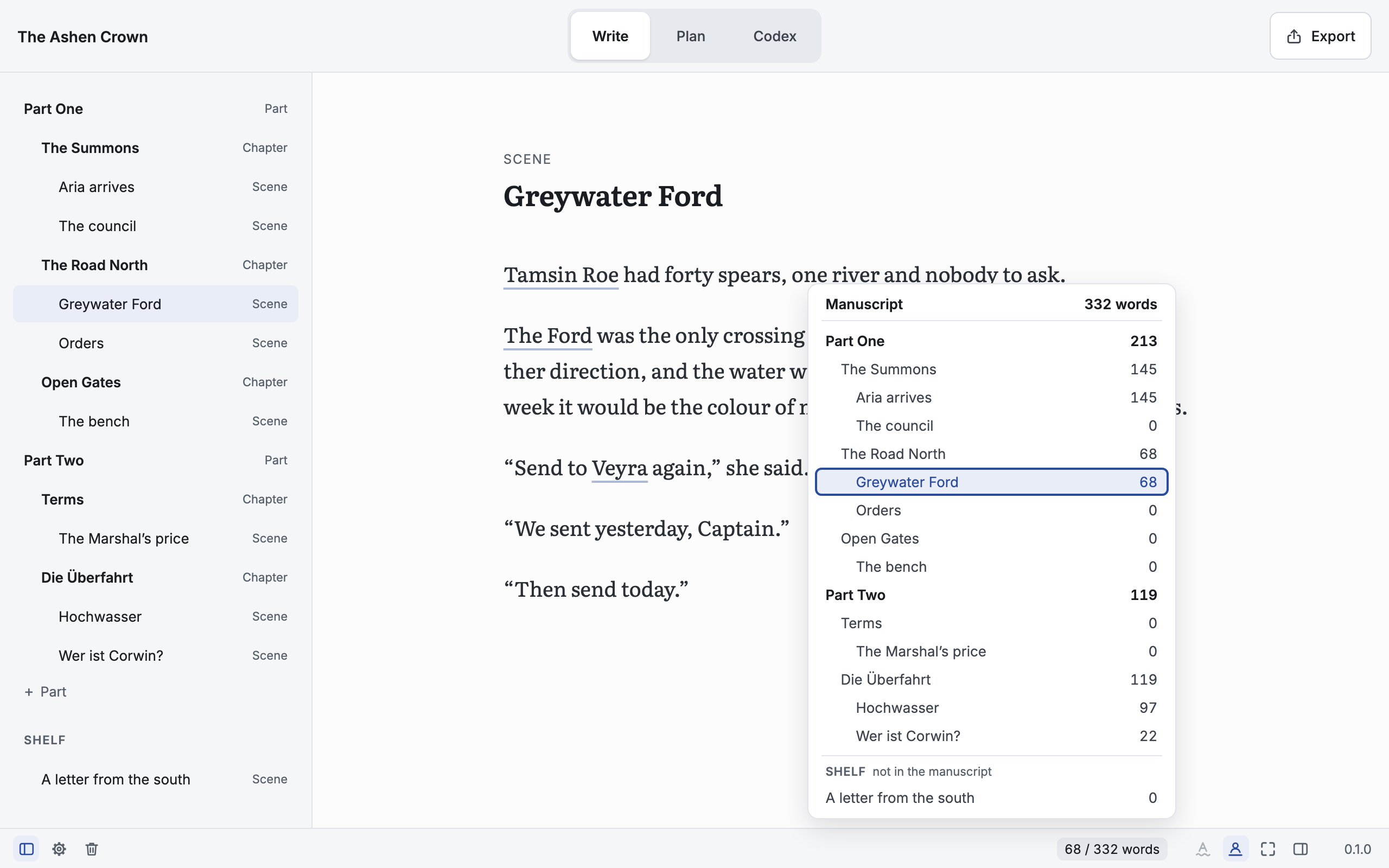
Click the word count in the status bar, or choose Show word counts in Commands, or View › Word Count in the menu bar.
The list shows your manuscript's words at the top, then every part, chapter and scene with its own, the one on screen marked. The scenes on the shelf come last. Click one, or choose it with the arrow keys and press Return, and it opens in Write. Esc closes the list.
Good to know
- Qwil counts the way an export does. Your notes, a scene's own headings and a dash standing alone aren't words. Quotations are.
- The Codex has no word count.
- Don't want it? Turn the word count off for one project. See Plugins.